Quick start
Get AssertJ Core
The AssertJ Core artifact can be included directly using its dependency metadata or indirectly via the Bill of Materials POM.
Maven
<dependency>
  <groupId>org.assertj</groupId>
  <artifactId>assertj-core</artifactId>
  <version>3.27.3</version>
  <scope>test</scope>
</dependency>Other build tools
Check this page to find the relevant Assertj Core dependency declaration.
Spring Boot
Spring Boot provides automatic support for managing the version of AssertJ Core used in your project.
In addition, the spring-boot-starter-test artifact automatically includes testing libraries such as JUnit Jupiter, AssertJ, Mockito, etc.
If you need to override the version of a dependency used in your Spring Boot application, you have to override the exact name of the version property defined in the BOM used by the Spring Boot plugin.
For example, the name of the AssertJ Core version property in Spring Boot is assertj.version.
The mechanism for changing a dependency version is documented for both Maven and Gradle.
With Maven, you can override the AssertJ Core version by including the following in your pom.xml file.
<properties>
  <assertj.version>3.27.3</assertj.version>
</properties>
With Gradle, you can override the AssertJ Core version by including the following in your build.gradle file.
ext['assertj.version'] = '3.27.3'Use Assertions class entry point
The Assertions class is the only class you need to start using AssertJ, it provides all the methods you need.
Alternatively your test class can implement WithAssertions to access the same methods.
One Assertions static import to rule them all …
import static org.assertj.core.api.Assertions.*;... or many if you prefer:
import static org.assertj.core.api.Assertions.assertThat;  // main one
import static org.assertj.core.api.Assertions.atIndex; // for List assertions
import static org.assertj.core.api.Assertions.entry;  // for Map assertions
import static org.assertj.core.api.Assertions.tuple; // when extracting several properties at once
import static org.assertj.core.api.Assertions.fail; // use when writing exception tests
import static org.assertj.core.api.Assertions.failBecauseExceptionWasNotThrown; // idem
import static org.assertj.core.api.Assertions.filter; // for Iterable/Array assertions
import static org.assertj.core.api.Assertions.offset; // for floating number assertions
import static org.assertj.core.api.Assertions.anyOf; // use with Condition
import static org.assertj.core.api.Assertions.contentOf; // use with File assertions
Alternative entry points
AssertJ provides other entry points class, notably the WithAssertions interface and BDDAssertions for BDD style assertions that replace assertThat by then.
WithAssertions example:
import org.assertj.core.api.WithAssertions;

public class WithAssertionsExamples extends AbstractAssertionsExamples implements WithAssertions {

  // the data used are initialized in AbstractAssertionsExamples.

  @Test
  public void withAssertions_examples() {

    // assertThat methods come from WithAssertions - no static import needed
    assertThat(frodo.age).isEqualTo(33);
    assertThat(frodo.getName()).isEqualTo("Frodo").isNotEqualTo("Frodon");

    assertThat(frodo).isIn(fellowshipOfTheRing);
    assertThat(frodo).isIn(sam, frodo, pippin);
    assertThat(sauron).isNotIn(fellowshipOfTheRing);

    assertThat(frodo).matches(p -> p.age > 30 && p.getRace() == HOBBIT);
    assertThat(frodo.age).matches(p -> p > 30);
  }
}
BDDAssertions example:
import static org.assertj.core.api.BDDAssertions.then;

public class BDDAssertionsExamples extends AbstractAssertionsExamples {

  // the data used are initialized in AbstractAssertionsExamples.

  @Test
  public void withAssertions_examples() {

    // then methods come from BDDAssertions.then static
    then(frodo.age).isEqualTo(33);
    then(frodo.getName()).isEqualTo("Frodo").isNotEqualTo("Frodon");

    then(frodo).isIn(fellowshipOfTheRing);
    then(frodo).isIn(sam, frodo, pippin);
    then(sauron).isNotIn(fellowshipOfTheRing);

    then(frodo).matches(p -> p.age > 30 && p.getRace() == HOBBIT);
    then(frodo.age).matches(p -> p > 30);
  }
}
IDE configuration
You can configure your IDE so that when you start typing as and trigger code completion assertThat will show up in the suggested completions.
Eclipse:
-
Go to Window > Preferences > Java > Editor > Content Assist > Favorites > New Type.
-
Enter
org.assertj.core.api.Assertionsand click OK. -
Check that you see
org.assertj.core.api.Assertions.*in Favorites.
Intellij Idea: No special configuration is needed, just start typing asser and then invoke completion (Ctrl-Space) twice.
Use code completion
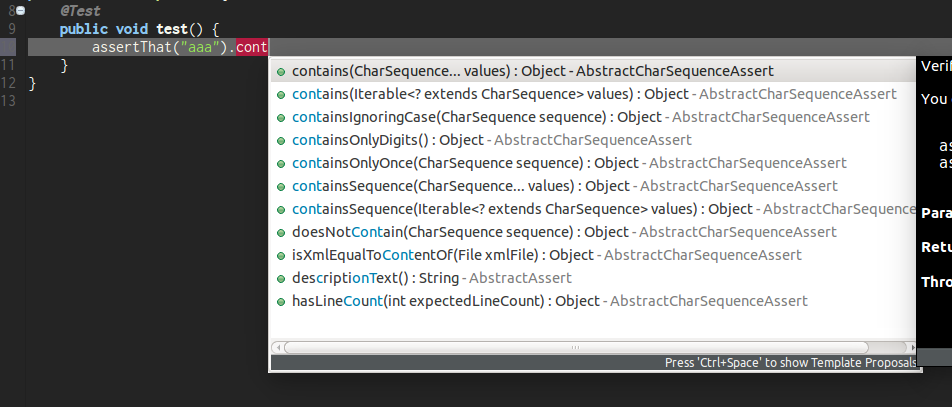
Type assertThat followed by the object under test and a dot … and any Java IDE code completion will show you all available assertions.
assertThat(objectUnderTest). (1)| 1 | Use IDE code completion after the dot. |
Example for String assertions:
Javadoc
http://www.javadoc.io/doc/org.assertj/assertj-core/ is the latest version of AssertJ Core Javadoc, each assertion is explained, most of them with code examples so be sure to check it if you want to know what a specific assertion does.